Case study / Robotics & integration engineering

Robotics telemetry.
From fleet to failure.

A browser-based console that connects geospatial fleet monitoring, a 3D Franka workcell, and session investigation in three focused workspaces.

Desktop portfolio prototypeSynthetic scenariosReact + TypeScript + Vite
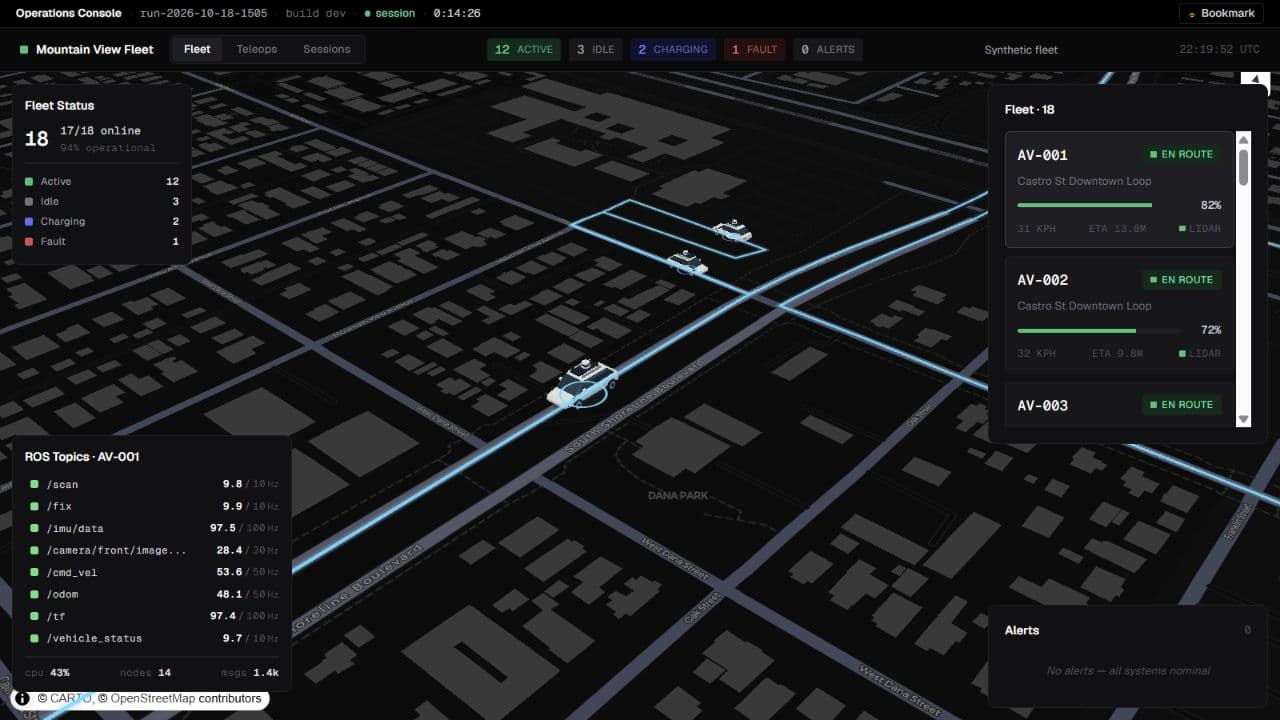
Fleet workspace with 3D robotaxis on a Mountain View street map, selected route, ROS topic rates, and fleet health
Fleet workspace: real geographic context with synthetic vehicle motion, health, and alerts. The original robotaxi model is Waymo-inspired, not an official Waymo asset or data source.

The problem

Robot state is spread across maps, joint readouts, events, and run histories. An operator needs to see which entity needs attention, inspect its state, and determine whether a run regressed without losing context between tools.

The approach

Organize the console around three levels of investigation: Fleet, Teleops, and Sessions. Shared selection and telemetry contracts connect overview to inspection, while explicit source and freshness states keep generated examples distinct from live integrations.

Three workspaces. One investigation.

01 / Fleet

Locate the issue in context.

Eighteen simulated vehicles move across Mountain View routes. Selecting a robotaxi connects its 3D map model, highlighted route, fleet card, and simulated ROS topic health. Ground rings communicate selection and operating state; battery, topic rates, and alerts guide inspection.
02 / Teleops

Inspect the Franka Cell.

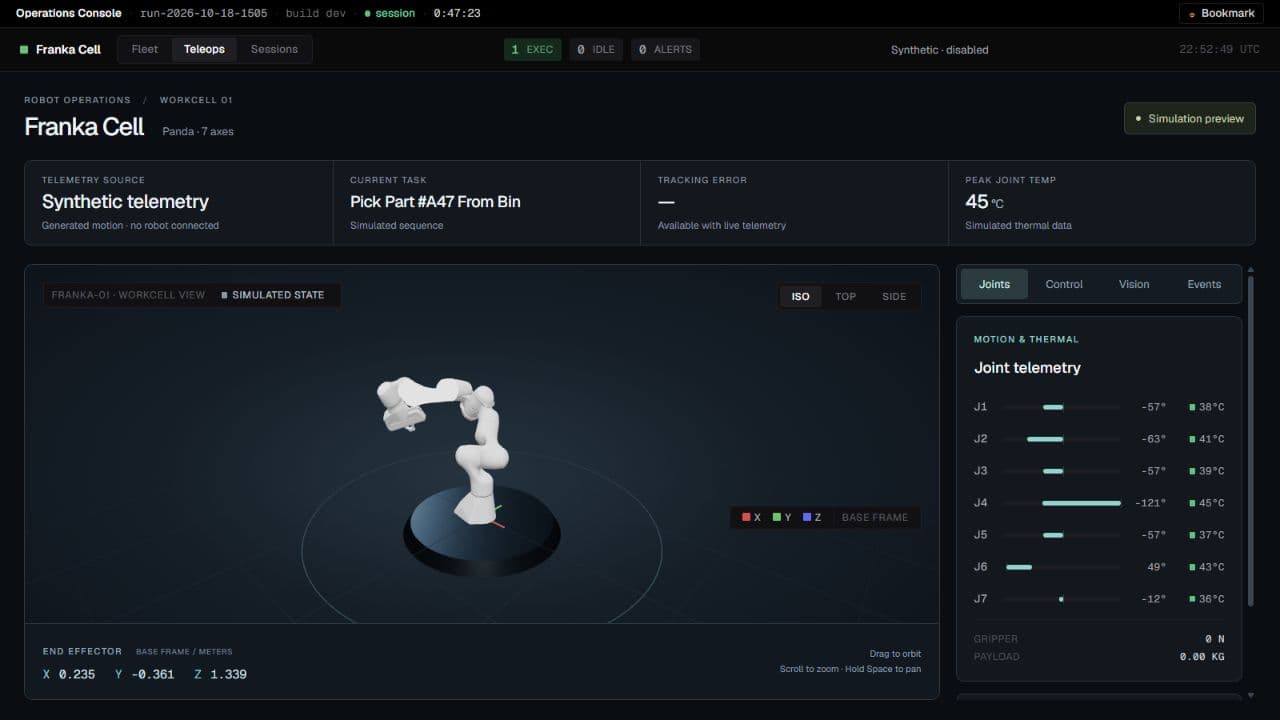
The redesigned workcell places a licensed seven-axis Panda model on a studio-lit stage, with task, source, tracking, and thermal summaries. A tabbed Joints / Control / Vision / Events inspector separates joint ranges and temperatures from operator actions. Camera presets and free orbit support inspection.

Franka Panda workcell on a studio-lit stage with joint telemetry bars and a tabbed inspector
Synthetic Franka fallback. The optional Webots-compatible WebSocket adapter supports telemetry, commands, and camera frames; live controls stay unavailable without valid fresh telemetry.

03 / Sessions

Trace the event. Compare the run.

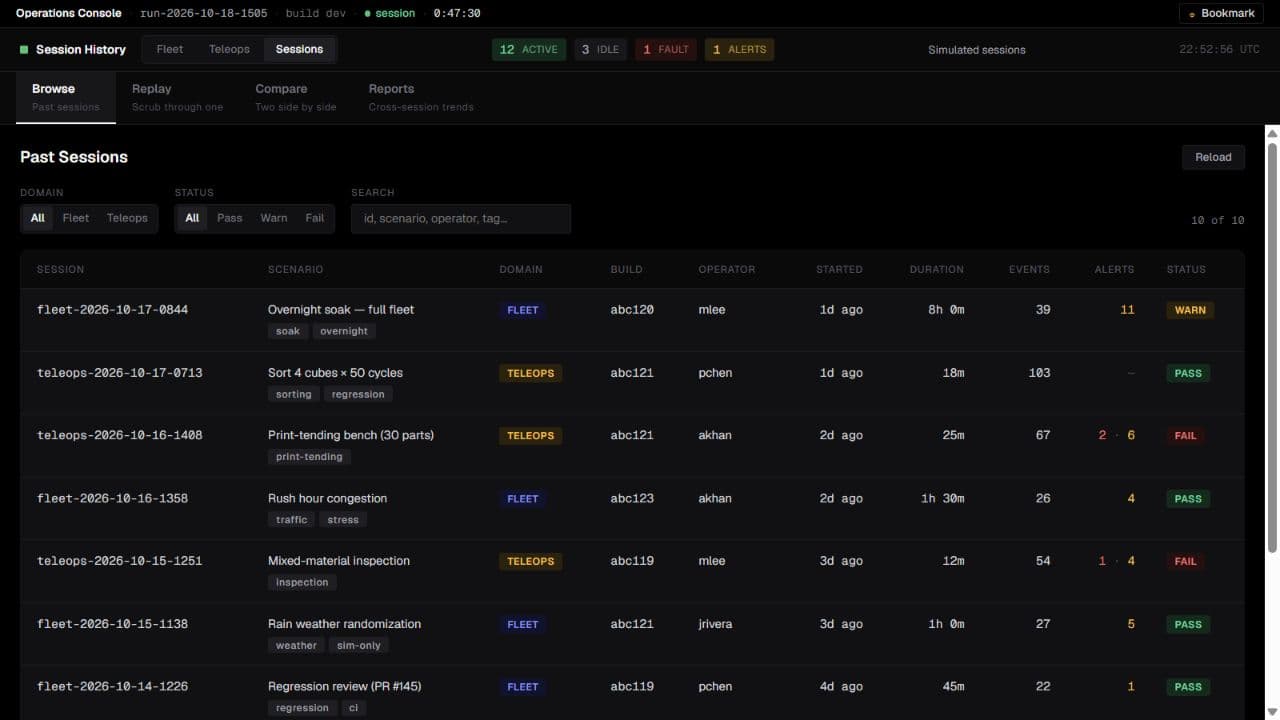
Ten seeded synthetic sessions span fleet and manipulation scenarios. Browse by scenario, build, severity, and outcome; inspect events; seek through generated replay; compare same-domain runs; and review domain-filtered reports.

Session browser listing scenarios, builds, durations, alerts, and pass or warning outcomes
Session browser: seeded records exercise investigation workflows, rather than document physical-robot trials.
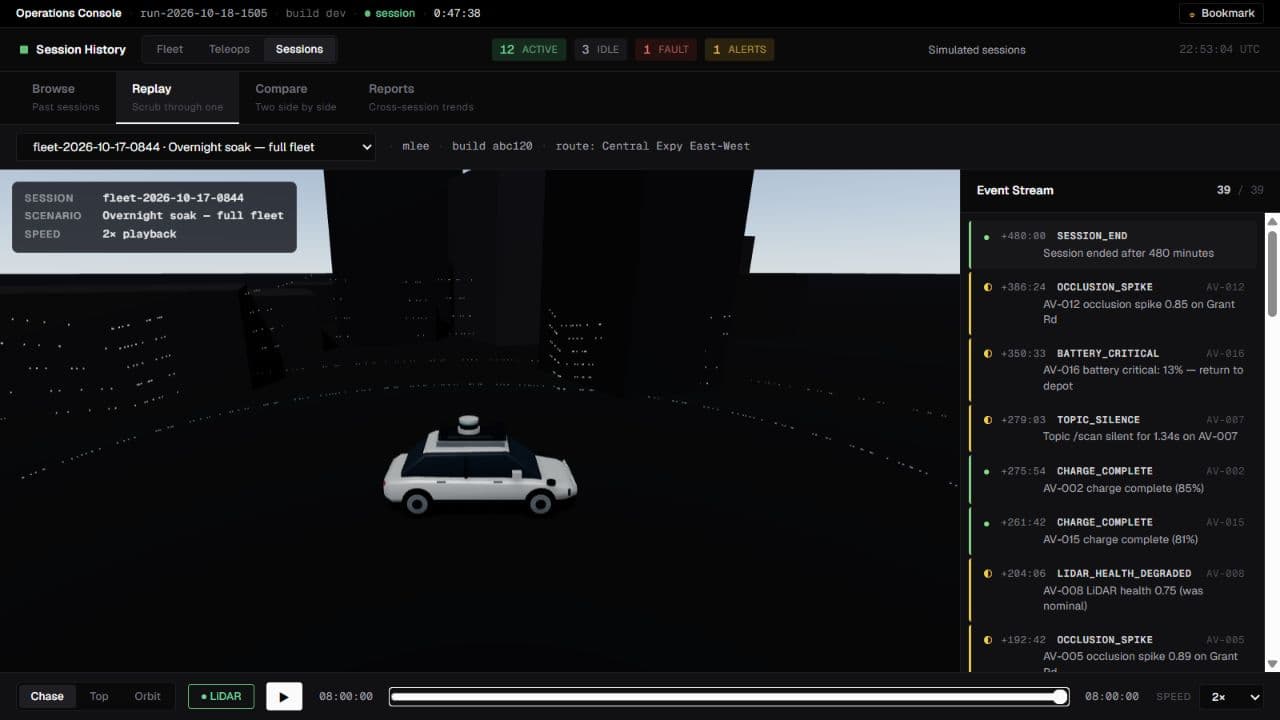
Generated 3D AV replay with synchronized events, a timeline, and playback controls
Replay: shared robotaxi geometry, generated scene geometry, and synthetic LiDAR points. This is not a reconstruction of a recorded drive.
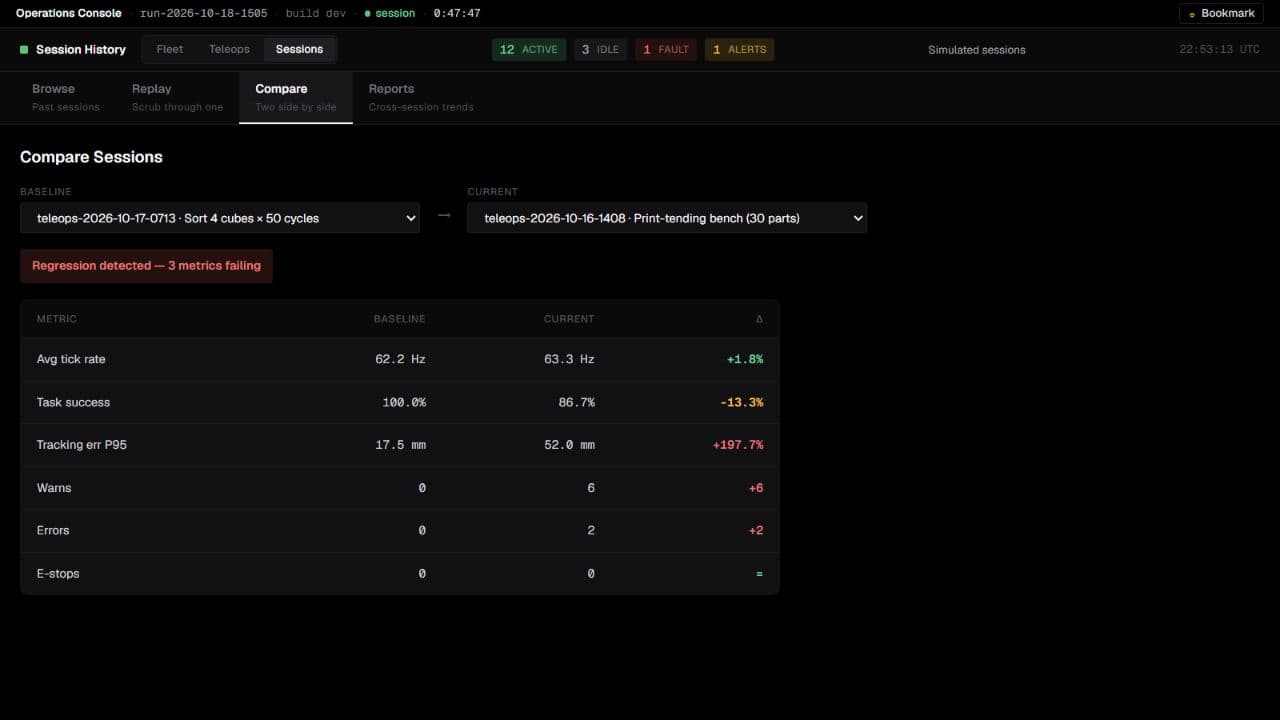
Session comparison showing differences in task success, tracking error, and warnings between runs
Comparison: baseline-relative changes make potential regressions visible, including explicit handling of zero baselines.
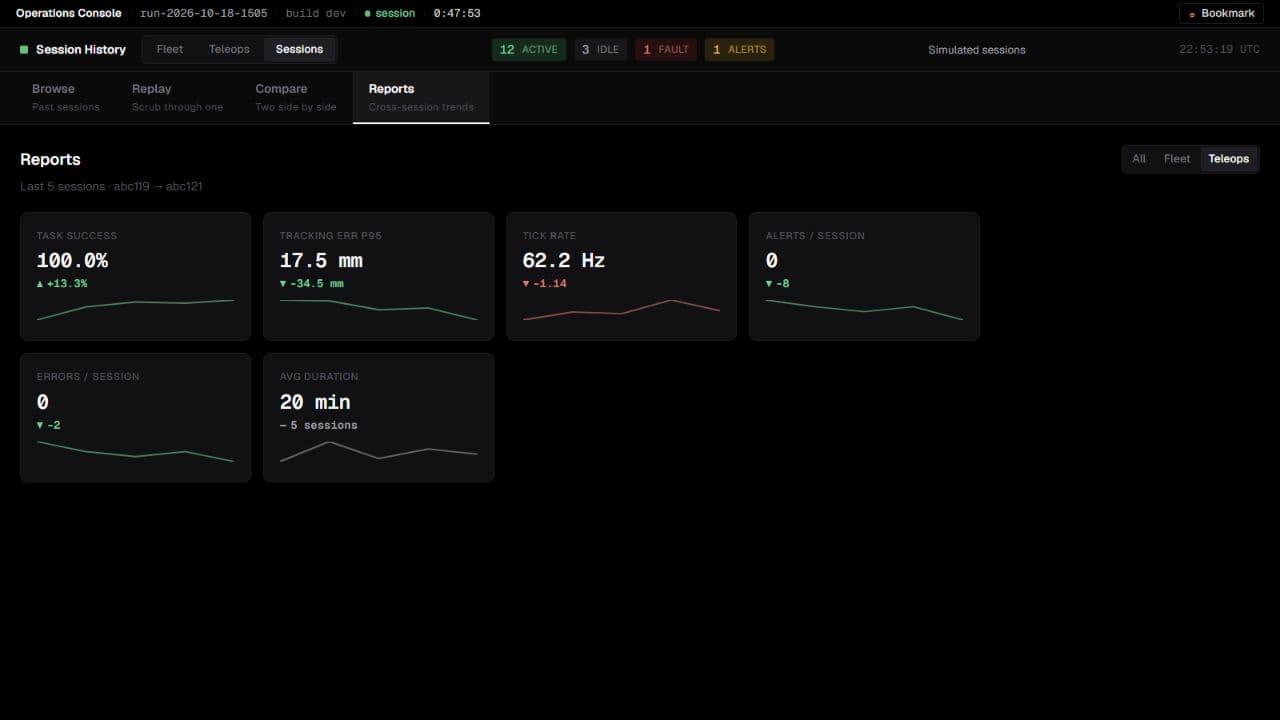
Teleops reports with task success, tracking error, tick rate, and alert trends
Reports: success rates, errors, and temperatures are generated interface examples, not measured robot outcomes.

Engineering for failure states.

One model, multiple views

Domain-specific adapters feed a shared telemetry contract. Fleet and replay share one original procedural robotaxi mesh; instanced Three.js geometry uses MapLibre’s camera. Enlarged map symbols communicate state rather than physical footprints.

Fresh data before live controls

Socket connectivity alone does not mean telemetry is live. Valid messages establish live state; the default three-second freshness timeout clears stale entities and camera state, disables commands, and triggers reconnection.

Preserve the last good session

Historical records use an atomic browser-local snapshot. Failed saves preserve the prior snapshot and surface an actionable error; complete legacy records can migrate. This is local persistence, not a shared session backend.

Load workspaces as needed

Map and 3D workspaces load on demand. This separates heavy graphics dependencies from the shell, although the default fleet view still loads map libraries and graphics bundle advisories remain.

Verification

The dashboard’s October 18, 2026 verification records a clean install, strict TypeScript checks, a production build, and 11 passing regression tests. Coverage includes timeout/reconnect behavior, command gating, disconnect cleanup, storage failure and migration, HTTP errors, comparison classification, and shared geometry checks.

Production-preview browser checks covered fleet selection, the Franka inspector and keyboard tabs, session browsing, replay, comparison, and reports. Integration failures were exercised with mocked sockets and HTTP responses.

Current scope

A standalone desktop frontend with synthetic fleet telemetry, seeded sessions, and generated replay. Optional live simulator and routing integrations have not been validated end to end. No physical-robot performance claims are made.

Production authentication, shared durable storage, physical robot validation, and broader mobile layouts remain future work. Hosted control requires an authenticated integration host and TLS endpoints. External map tiles and routing services remain dependencies.

Stack: React 18 · TypeScript · Vite · deck.gl · MapLibre · React Three Fiber · Three.js · WebSocket adapter. Map imagery uses CARTO / OpenStreetMap attribution; the Panda model includes its upstream license. Captures: October 18, 2026.

← Back to projects